Windows 10 + 11Fully reversible
More game.
Less Windows.
Nothing permanent.
Trix finds the Windows settings quietly working against your games, recommends what matters for your PC, and saves every old value before changing it.
No card · no trial timer · full access from $5 a month
Recommended for your PC
Trix reads your hardware and puts the useful tweaks first, with a plain-English reason for each one.
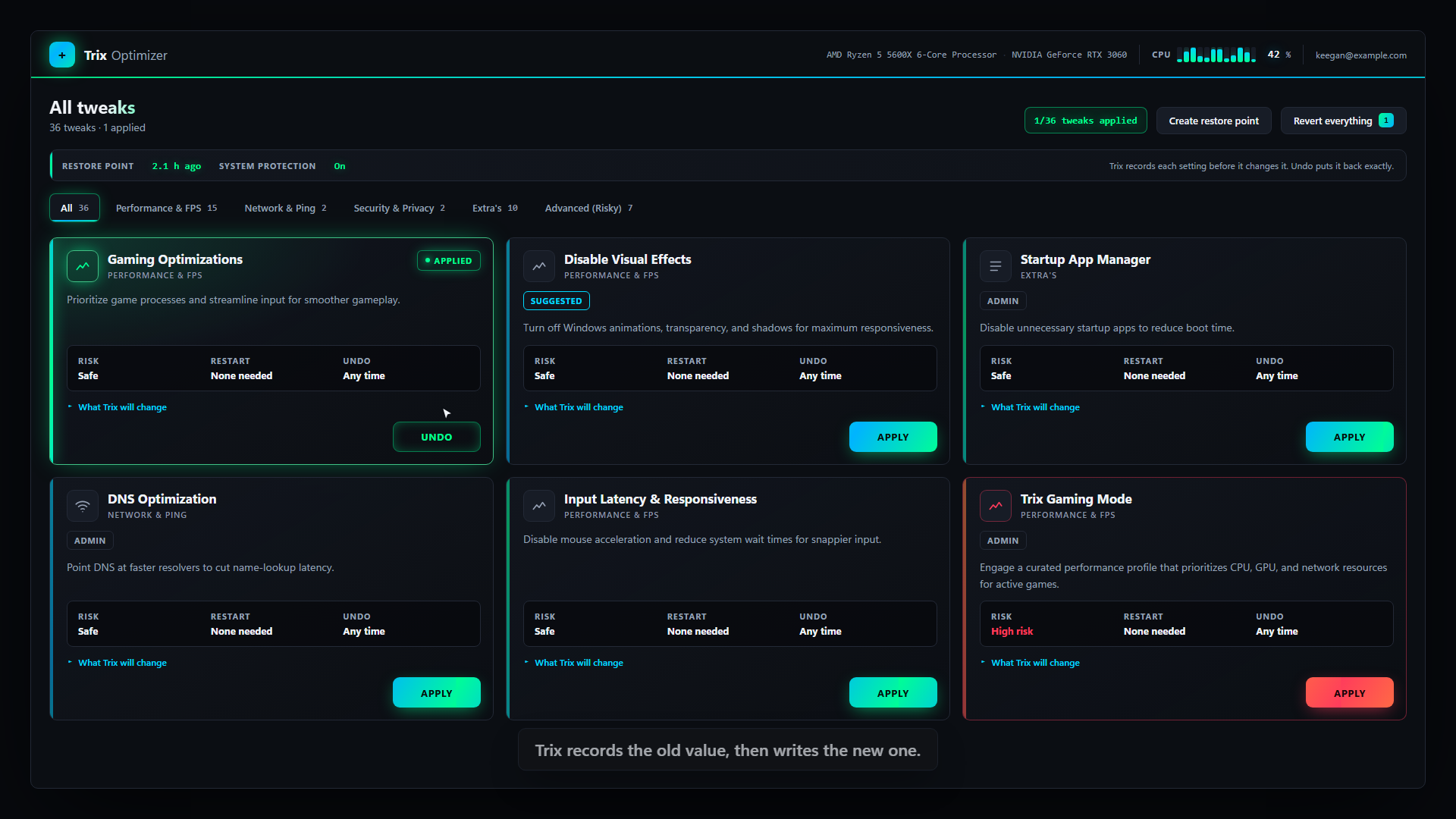
A real Trix Optimizer screen. Select a numbered part to see how it protects your machine.
What we can actually prove.
We have not published performance benchmarks yet. What we can show is every tweak's real apply path, its saved prior state, and the exact route back.
Inspect the safety modelThe safety model
Undo is built into every tweak.
A free tweak script usually starts at step three. Trix does the work before and after the change too.
-
01
Current value
Read
Check the current Windows value and the machine conditions that make a tweak safe.
-
02
Saved locally
Record
Save the prior state and ask Windows to create a restore point when the system permits it.
-
03
Applied
Change
Apply only the tweak you selected, after showing its risk and restart cost.
-
04
Reversible
Put it back
Use the recorded value to undo one tweak — or return the whole machine.
Try the mechanism
Try a reversible change yourself.
This sample is interactive, but it never touches your PC. It shows the same saved-value pattern Trix uses in the desktop app.
- GameDVR_FSEBehaviorMode = 0
- GameDVR_FSEBehaviorMode = 2
Your current value stays unchanged until you press apply.
The product walkthrough
Watch one change get made and reversed.
This guided walkthrough uses the current Trix interface to show one tweak being reviewed, applied, and taken back.
We show no performance figures because none have been measured yet.
The tweak catalog
Your machine decides what matters.
Trix detects your CPU, GPU, memory, and power setup, then highlights useful tweaks. You can still inspect the full catalog — there are no mystery buttons.
01 Performance & FPS
Game priority, background recording, CPU, memory, and graphics settings.
Gaming Optimizations · CPU Optimizations · Memory Management
02 Network & Ping
Network throttling, QoS, DNS, and connection behavior.
QoS Tuning · DNS Optimization
03 Security & Privacy
Telemetry and security tradeoffs, clearly marked before they are changed.
Disable VBS · Telemetry services
04 Extras
Startup apps, pre-installed software, maintenance, and OneDrive.
Startup Manager · Windows Debloat · Remove OneDrive
! Higher-risk tweaks are kept apart, marked clearly, and check BitLocker, Secure Boot, Hyper-V, WSL, and multi-GPU conditions first.
Pick your plan
Prove it on your PC first.
Pick three tweaks free. If Trix earns a place on your machine, unlock the rest — and keep it current as Windows keeps moving underneath it.
Stop paying and nothing breaks. Undo stays free forever, so your PC is never held hostage by a lapsed plan.
$5
per month · cancel any time
- Full tweak catalogIncluded
- Per-tweak undoAlways free
- Revert everythingAlways free
- Hardware-based recommendationsIncluded
Your three free tweaks stay yours. Cancel from your account in two clicks.